Examples make Shopify SEO easier to judge
Most advice sounds sensible until it has to be applied to a real page type. Examples show what actually changes.
Fix the page problem, not just the SEO field
The strongest examples usually improve page meaning: collection intent, product evidence, internal links, redirects, crawl control or measurement.
Use examples as decision patterns
These are not fake case studies. They are practical patterns you can use when reviewing a Shopify store.
Shopify SEO makes more sense when you look at page examples
Generic advice is easy.
Applying it to a Shopify store is harder.
“Improve your SEO” could mean rewriting a title tag, rebuilding a collection, strengthening product evidence, controlling filters, fixing redirects, removing app output or repairing tracking.
Those are very different jobs.
This page gives practical examples of what Shopify SEO improvement actually looks like. They are not client case studies. They are decision patterns you can use when reviewing a real store.
Example beats theory. Theory has nicer shoes, but example does the work.
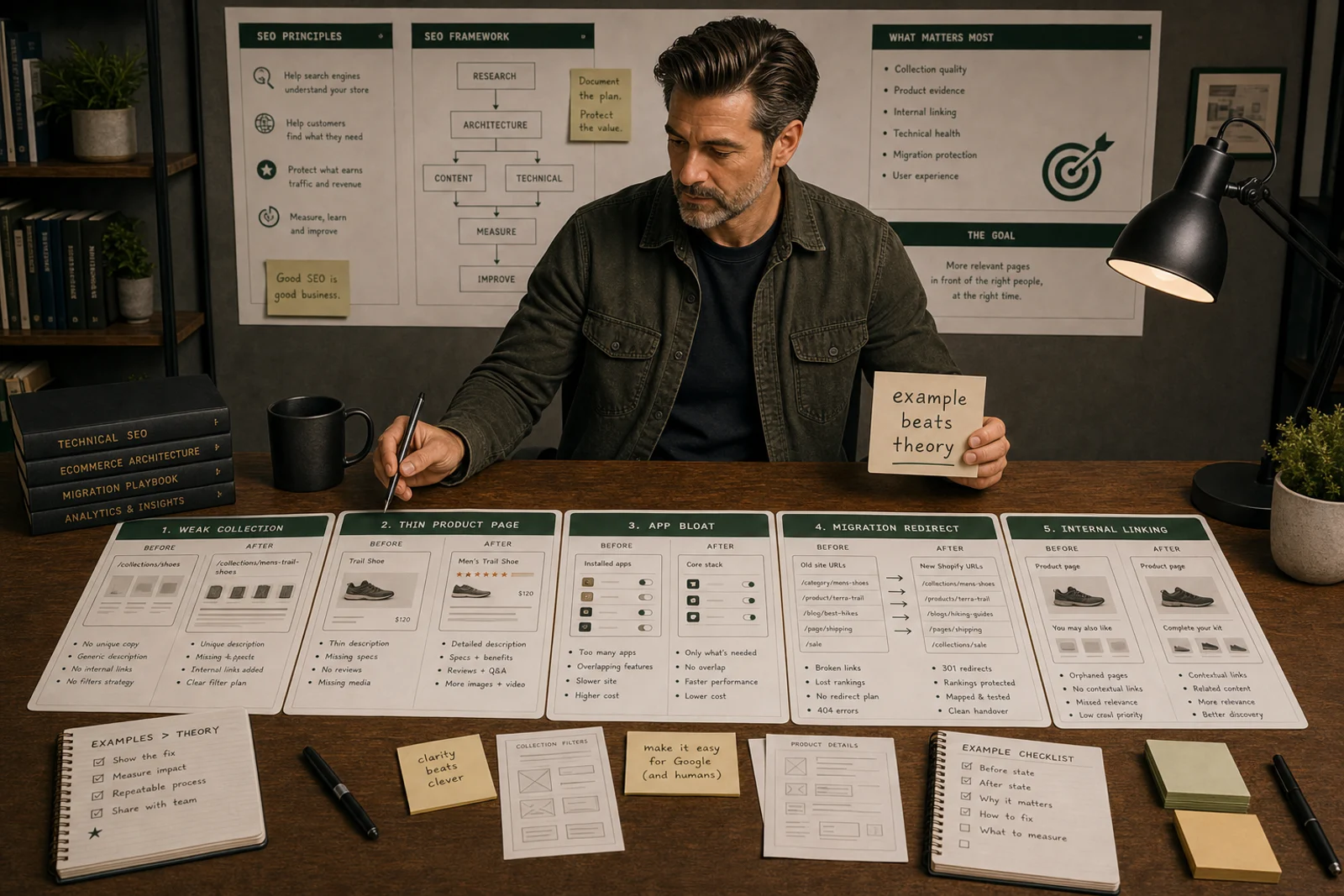
Example 1: Weak collection page
Before
A collection page is called Summer.
It contains a product grid, no useful introduction, no related links and no clear buying guidance. Search Console shows impressions for “linen summer dresses”, but the page contains mixed products and no strong category signal.
Problem
The issue is not only the title tag.
The collection intent is unclear.
Better fix
Create or improve a dedicated collection for the real demand:
- clear H1;
- relevant products;
- short useful intro;
- filters for size, colour and material;
- internal links from related guides;
- lower-page buying guidance;
- FAQ section where useful;
- title and meta aligned with the page.
Use Shopify collection page SEO for the full collection-page process.
Example 2: Thin product page
Before
A product page has a product title, price, one image and supplier copy.
It is indexed but gets few clicks. Shoppers keep asking about sizing, material and compatibility.
Problem
The page does not provide enough product evidence.
Better fix
Improve:
- product name clarity;
- specifications;
- variant labels;
- product images;
- delivery and return signals;
- compatibility notes;
- reviews or questions where available;
- links back to the parent collection.
Then update the title and description.
Do not polish metadata before the product is understandable.
Use Shopify product page SEO for the deeper guide.
Example 3: App bloat pretending to be SEO
Before
A store has multiple SEO apps:
- one edits metadata;
- one adds schema;
- one compresses images;
- one monitors rankings;
- one creates audit scores.
The store is slower, schema appears duplicated and nobody knows which app owns what.
Problem
The stack is creating complexity without clear decisions.
Better fix
Create an app log:
| App | Job | Pages affected | Keep/test/remove |
|---|---|---|---|
| Metadata app | Bulk editing | Products/collections | Test need |
| Schema app | Structured data | Product pages | Check conflicts |
| Image app | Compression | Product media | Keep if measured |
| Rank tool | Monitoring | Reports | Keep only if acted on |
Remove or replace apps that do not solve a proven operating problem.
Use Shopify SEO apps to avoid.
Example 4: Redirect mistake after migration
Before
An old WooCommerce category URL redirects to the Shopify homepage.
The old URL had rankings, backlinks and revenue history.
Problem
The redirect technically works but fails the user intent.
Better fix
Redirect the old URL to the closest relevant Shopify collection.
Then:
- compare old and new page intent;
- rebuild missing category content;
- update internal links;
- monitor Search Console;
- check analytics landing-page data.
If traffic already dropped, use Shopify SEO traffic drop after migration.
Example 5: Blog posts that do not support collections
Before
A store has useful guides, but they link mostly to other guides or the homepage.
Priority collections are buried in navigation.
Problem
Informational content is not supporting commercial pages.
Better fix
Map each useful guide to a commercial next step:
- guide about materials -> material collection;
- guide about sizing -> relevant products and collection;
- comparison guide -> collection and product alternatives;
- migration/support page -> relevant resource or service CTA.
Use Shopify blog to collection internal linking for the linking process.
Example 6: Filter page confusion
Before
Filters create URLs for every colour, size, price and sort combination.
Some get crawled. Some get impressions. Most are thin.
Problem
The store has no filter indexation policy.
Better fix
Decide which modifiers deserve real landing pages.
For valuable demand, create a proper collection. For normal shopper filtering, keep the filter useful but do not treat every combination as an SEO page.
Use Shopify faceted navigation SEO.
Example 7: Reporting hides the issue
Before
Organic traffic is flat.
The team wants to rewrite blog posts.
Problem
Total traffic hides page-type movement.
Better fix
Separate reporting by:
- collections;
- products;
- guides;
- migrated URLs;
- brand queries;
- non-brand queries;
- revenue/assisted value.
The real issue might be collections losing impressions while guides are growing.
Use Shopify SEO revenue by page type.
What not to do
Do not treat every SEO issue as metadata.
Do not fix low-value pages before priority pages.
Do not add apps without knowing the page problem.
Do not redirect old URLs to the homepage by default.
Do not write more copy when the product set is wrong.
Do not report total traffic when page types are moving differently.
How to use these examples
For any Shopify SEO issue, ask:
- Which page type is affected?
- What is the page supposed to do?
- What evidence shows the problem?
- Is this a content, technical, link, migration, app or measurement issue?
- What is the smallest fix that improves meaning?
- How will the change be monitored?
That turns examples into decisions.
And decisions are where the useful SEO work starts.
Quick answer
Shopify SEO becomes operational when the constraint is clear, the right page type is fixed, the output is tested and the commercial impact is reported.
What you will do
- Prioritise technical SEO work by page type and business value.
- Fix crawl, indexation, metadata, template, image and internal-link problems in the right order.
- Decide when a tool is needed and when native Shopify controls are enough.
What to check first
- Shopify admin for search listings, redirects, products, collections and theme settings.
- Google Search Console for indexing, queries and landing-page movement.
- GA4 or Shopify reports for commercial impact.
- Research tools for keyword, competitor and audit processes.
- TinyIMG where image handling is the repeated constraint.
Work through it in this order
- Choose the page type being fixed: collection, product, blog, page, filter, vendor or migration URL.
- Check crawlability, indexability, canonical, title, H1, internal links, schema and page speed.
- Compare Search Console queries with the page intent.
- Fix the template or content pattern before editing dozens of individual pages.
- Retest the page in a crawler, browser, structured data validator and Search Console where relevant.
- Record the change date, owner, expected impact and next review date.
Real-world notes
- Most Shopify SEO gains come from page architecture and template fixes, not from installing another SEO app.
- Collection pages usually carry the commercial opportunity; product pages usually supply evidence and conversion detail.
- A technical fix that is not tied to a page type and a commercial priority becomes backlog noise.
Final checks
- Page type selected.
- Primary query intent confirmed.
- Canonical and indexability checked.
- Title, H1 and meta reviewed.
- Internal links updated.
- Schema output checked.
- Image weight reviewed.
- Change logged for reporting.
Watch-outs
- Do not index every filter combination. Create clean collections for valuable facets instead.
- Do not change handles on ranking pages unless the redirect and internal-link update are ready.
- Do not trust app-generated schema until you inspect the final page output.
Use the Shopify SEO Audit Checklist, then move into the roadmap, URL structure or collection guide for the page type in front of you.
Field questions
What is an example of good Shopify SEO?
A good example is a collection page that matches search intent, shows relevant products, includes useful buying guidance and links to related products and guides.
What is a bad Shopify SEO example?
A bad example is adding keywords to a title tag while leaving the collection vague, the product data thin and internal links weak.
Can Shopify product pages rank?
Yes, especially for product names, SKUs, variants and specific product queries. Broad category queries usually need collection pages.
What should I fix first on a Shopify store?
Fix the highest-value page type with the clearest weakness: often collections, product evidence, crawl/indexation, redirects, internal links or tracking.
How do I know if a Shopify SEO fix worked?
Track the affected page type in Search Console and analytics. Look for better impressions, clicks, engagement, conversions or clearer diagnosis.
Should every Shopify SEO example use an app?
No. Many good Shopify SEO examples involve page structure, content clarity, internal links and measurement rather than apps.