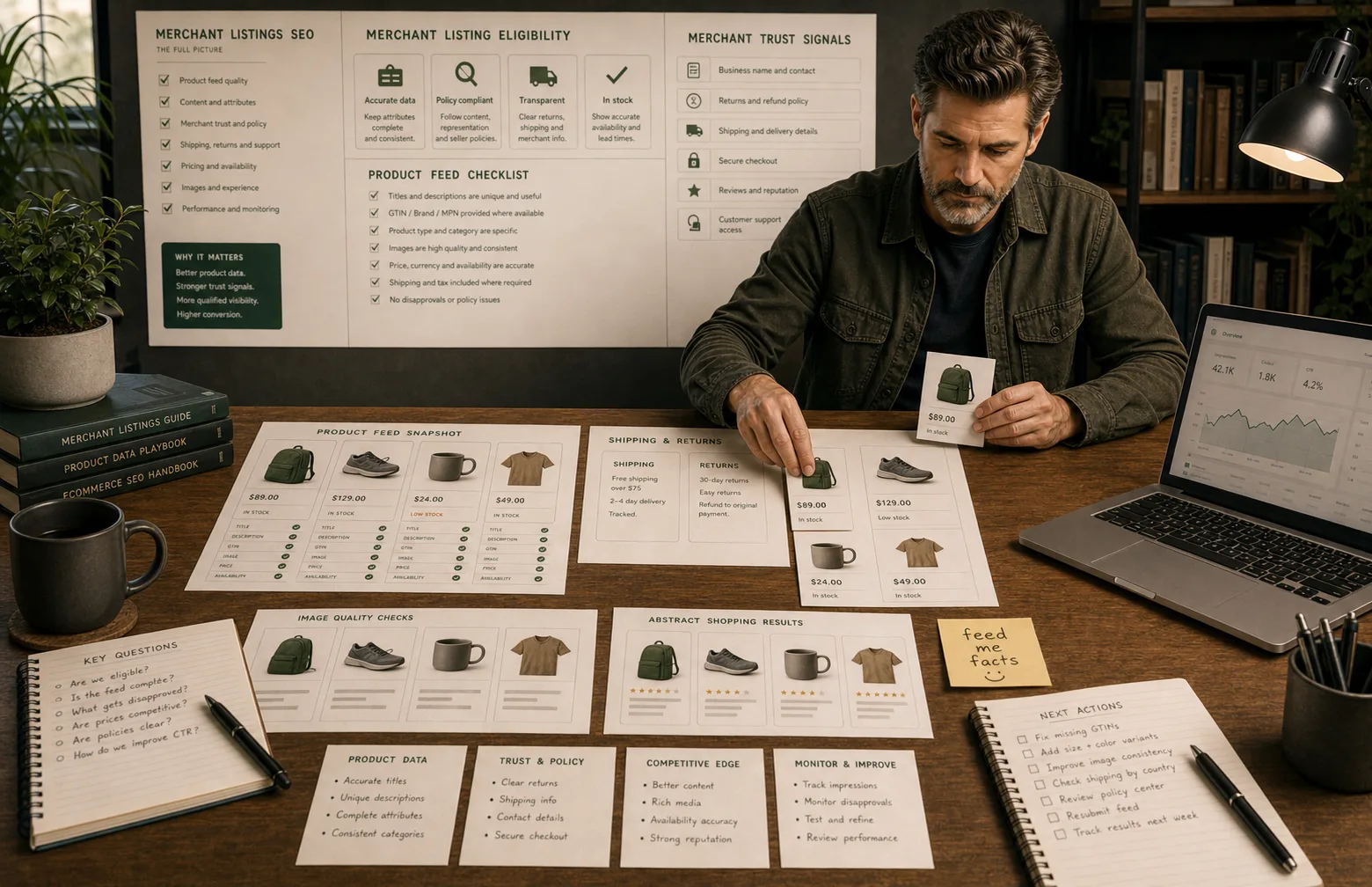
Merchant listings need reliable product truth
Merchant listings are not won by metadata alone. Product feed data, page content, structured data, shipping, returns, images and trust signals need to agree.
Product data is a conversion asset
Better product data supports search, shopping results, AI discovery and shopper confidence. It should be managed like commercial infrastructure.
Eligibility is not guaranteed
Google can use product data in different ways, but richer eligibility depends on accurate data, policy compliance, page quality and ongoing monitoring.
Merchant listings are where product data becomes visible
Shopify SEO is not only about pages.
For product-led stores, it is also about whether product information is complete, consistent and trustworthy enough to be used across search and shopping results.
That is where merchant listings matter.
Google’s documentation describes merchant listings as richer purchase-oriented product experiences. They can use details such as price, availability, shipping, returns and product attributes where the data is eligible and accurate.
There is no magic listing switch.
It is a product-data discipline.
A Shopify store with vague product titles, weak images, missing identifiers, inconsistent availability and unclear returns should not expect merchant listing improvements to come from a single setting.
The job is to make the product truth strong enough that the page, feed, schema and merchant policies all tell the same story.
The merchant-listing stack
Merchant listings work as a stack, not a single feature.
| Layer | What it contributes | Common Shopify weakness |
|---|---|---|
| Product page | Visible product information and shopper trust. | Thin descriptions, weak variants, missing shipping/returns. |
| Structured data | Machine-readable product details from the page. | Duplicate schema, missing offers, app conflicts. |
| Product feed | Merchant Center product attributes. | Missing GTINs, weak titles, bad categories, stale availability. |
| Merchant policies | Shipping, returns, business and support signals. | Policy pages exist but do not match product/feed data. |
| Images | Product understanding and visual eligibility. | Low-quality images, missing variants, inconsistent media. |
| Monitoring | Disapprovals, warnings, clicks and revenue. | No regular product-data QA. |
If one layer disagrees with the others, the store becomes harder to trust.
Check the product feed against the page
The product feed is often where the problem becomes visible.
Google Merchant Center’s product data specification covers the attributes merchants use to describe products, including identifiers, price, availability, images, product type and more.
On Shopify, feed quality often depends on:
- product titles;
- product descriptions;
- product types and categories;
- variants;
- images;
- stock status;
- price and sale price;
- brand;
- GTIN, MPN or SKU;
- shipping settings;
- return policies;
- app/channel configuration.
The practical question is not “is the feed connected?”
The useful test is simple:
the feed should describe the same product a shopper sees on the page.
If the feed says one thing, the product page says another, and structured data says a third thing, the problem is not SEO. It is product-data governance.
Product titles: clear beats clever
Merchant listing product titles need to identify the product clearly.
A weak title might be:
Classic Tee
A stronger title might be:
Organic Cotton Classic T-Shirt - Navy
The stronger title is not keyword stuffing. It helps identify:
- product type;
- material;
- model/style;
- colour;
- variant.
For Shopify stores, product titles often become messy when merchandising names are cute but not informative. Cute can work on a product card if the surrounding page explains the item. It works less well in a feed where the product has to stand on its own.
Use clarity first. Personality can sit around it.
Product identifiers: do not fake what you do not have
GTIN, MPN, SKU and brand data can help product matching and understanding.
But inaccurate identifiers are worse than missing ones.
Use this rule:
- if a real GTIN exists, include it accurately;
- if the product is private label and has no GTIN, use the appropriate available identifier and brand data;
- do not invent identifiers to satisfy a checklist;
- keep identifiers consistent between product admin, feed and structured data.
This is one of those boring details that matters. Product data has many tiny hinges.
Images: merchant listings are visual
Product images affect more than the product page.
They can influence shopper confidence, image search, product understanding and shopping presentation.
Check:
- main image quality;
- background consistency;
- variant images;
- image size and compression;
- no watermarks or promotional overlays where they create policy risk;
- product visibility;
- alt text where useful;
- consistency between feed image and page image.
If a product has weak imagery, a feed fix will not make it feel trustworthy.
Use the Shopify image SEO checklist if media quality is the recurring issue.
Price and availability must be boringly accurate
Price and availability errors damage trust quickly.
Common problems:
- sale price shown in one place but not another;
- out-of-stock variants still presented as available;
- feed updates lag behind Shopify stock changes;
- currency mismatches;
- landing page price differs from feed price;
- product page scripts delay price rendering.
For priority products, compare:
- Shopify admin price and stock;
- visible product page price and availability;
- structured data offer;
- Merchant Center feed data;
- any regional shipping or tax settings.
If these disagree, fix the data flow before diagnosing search performance.
Shipping and returns are not small print
Shipping and returns affect purchase confidence.
Google’s merchant listing documentation and product documentation both treat shipping and returns as meaningful product/merchant information.
For Shopify stores, this means checking:
- shipping policy page;
- return policy page;
- product-page shipping blocks;
- free shipping thresholds;
- delivery estimates;
- regional shipping rules;
- return window and fees;
- product-specific exceptions;
- feed or Merchant Center settings.
The mistake is hiding all of this in policy pages and assuming the product page is done.
If shipping or returns affect the purchase decision, make them visible enough for shoppers and consistent enough for systems.
The Shopify merchant listing audit
Use this on priority products before changing apps.
| Audit question | What to check |
|---|---|
| Is the product eligible? | Policy compliance, landing page quality, product availability. |
| Is the title useful? | Product type, brand/model, variant attributes where appropriate. |
| Is the description specific? | Product details, use case, material, compatibility, care. |
| Are images strong? | Main image, variant images, quality, consistency, no risky overlays. |
| Is price accurate? | Page, feed, schema and checkout alignment. |
| Is availability accurate? | Variant stock and feed updates. |
| Are identifiers present? | GTIN, MPN, SKU and brand where genuinely available. |
| Are shipping/returns clear? | Product page, policy pages, feed/Merchant Center settings. |
| Is schema aligned? | Product and offer data matching the visible page. |
| Is performance monitored? | Disapprovals, warnings, impressions, clicks, revenue. |
Do not run this on every product first.
Prioritise:
- best sellers;
- high-margin products;
- products already getting impressions;
- products with disapprovals or warnings;
- products supporting priority collections.
Feed, schema and page should agree
The strongest Shopify setup has alignment between:
- visible product page content;
- product structured data;
- Merchant Center feed attributes;
- Shopify admin product data;
- shipping and return policies.
If those layers agree, the store is easier to understand.
If they disagree, no single layer can rescue the system.
Shopify product schema and merchant listings belong in the same review. Schema is the page-level machine-readable layer. Feed data is the merchant-data layer. The product page is what shoppers actually judge.
Where AI shopping fits
AI-influenced discovery makes product data even more important.
When search systems, shopping results or AI agents evaluate products, they need clear source information:
- what the product is;
- who sells it;
- whether it is available;
- what it costs;
- how it differs from variants;
- whether it can be shipped or returned;
- whether the merchant looks trustworthy.
That does not require AI-specific product pages.
It means making product truth easier to parse everywhere.
Use Shopify AI visibility if the wider issue is whether categories, products and brand evidence are clear enough for AI-influenced discovery.
What not to do
Avoid:
- installing another feed app before checking product data;
- adding schema that contradicts the page;
- making titles unreadable for the sake of attributes;
- ignoring product identifiers where they genuinely exist;
- letting unavailable variants look purchasable;
- treating Merchant Center warnings as someone else’s problem;
- changing product feeds without checking collection and product-page impact;
- chasing rich appearances before the product page is useful.
Merchant listing work is not glamorous. That is partly why it is valuable. Many stores underinvest in it.
What good looks like
A strong Shopify merchant-listings setup produces:
- accurate product titles and descriptions;
- complete product attributes where available;
- consistent price and availability;
- clear shipping and return information;
- strong product images;
- product schema that matches the visible page;
- feed data that matches Shopify reality;
- monitored warnings and disapprovals;
- a process for product imports and catalogue changes.
The aim is not to satisfy a tool.
The aim is to make products easier to trust, compare and buy.
Where to go next
If product structured data is unclear, start with Shopify product schema.
If product pages themselves are thin, use Shopify product page SEO.
If the problem is bigger than product data, open the Shopify SEO priority planner and decide which page type deserves the next fix.
Quick answer
Shopify SEO becomes operational when the constraint is clear, the right page type is fixed, the output is tested and the commercial impact is reported.
What you will do
- Prioritise technical SEO work by page type and business value.
- Fix crawl, indexation, metadata, template, image and internal-link problems in the right order.
- Decide when a tool is needed and when native Shopify controls are enough.
What to check first
- Shopify admin for search listings, redirects, products, collections and theme settings.
- Google Search Console for indexing, queries and landing-page movement.
- GA4 or Shopify reports for commercial impact.
- Research tools for keyword, competitor and audit processes.
- TinyIMG where image handling is the repeated constraint.
Work through it in this order
- Choose the page type being fixed: collection, product, blog, page, filter, vendor or migration URL.
- Check crawlability, indexability, canonical, title, H1, internal links, schema and page speed.
- Compare Search Console queries with the page intent.
- Fix the template or content pattern before editing dozens of individual pages.
- Retest the page in a crawler, browser, structured data validator and Search Console where relevant.
- Record the change date, owner, expected impact and next review date.
Real-world notes
- Most Shopify SEO gains come from page architecture and template fixes, not from installing another SEO app.
- Collection pages usually carry the commercial opportunity; product pages usually supply evidence and conversion detail.
- A technical fix that is not tied to a page type and a commercial priority becomes backlog noise.
Final checks
- Page type selected.
- Primary query intent confirmed.
- Canonical and indexability checked.
- Title, H1 and meta reviewed.
- Internal links updated.
- Schema output checked.
- Image weight reviewed.
- Change logged for reporting.
Watch-outs
- Do not index every filter combination. Create clean collections for valuable facets instead.
- Do not change handles on ranking pages unless the redirect and internal-link update are ready.
- Do not trust app-generated schema until you inspect the final page output.
Use the Shopify SEO Audit Checklist, then move into the roadmap, URL structure or collection guide for the page type in front of you.
Field questions
What are merchant listings in Google Search?
Merchant listings are purchase-oriented product experiences where Google can show richer product information such as price, availability, shipping, returns and product details for items sold by merchants.
Does Shopify support merchant listings?
Shopify stores can support merchant listing eligibility through product pages, structured data, product feeds, Google & YouTube channel setup, Merchant Center data and accurate store policies.
Is a product feed enough for merchant listings?
No. A feed is important, but page content, structured data, images, price, availability, shipping, returns and policy compliance should agree.
What product data should Shopify stores improve first?
Start with titles, descriptions, images, price, availability, GTIN or MPN where available, product type, brand, shipping, returns and variant attributes.
Why do products get disapproved in Merchant Center?
Common reasons include inaccurate price or availability, missing required attributes, policy issues, poor image quality, landing page mismatch or inconsistent shipping and return information.
Can merchant listings help SEO?
They can improve product visibility and search appearance where eligible, but they should be treated as part of product data quality rather than a replacement for normal Shopify SEO.
How often should product feed data be checked?
Check priority products regularly and after theme changes, feed app changes, price changes, stock changes, shipping updates or product imports.