Examples prevent vague collection advice
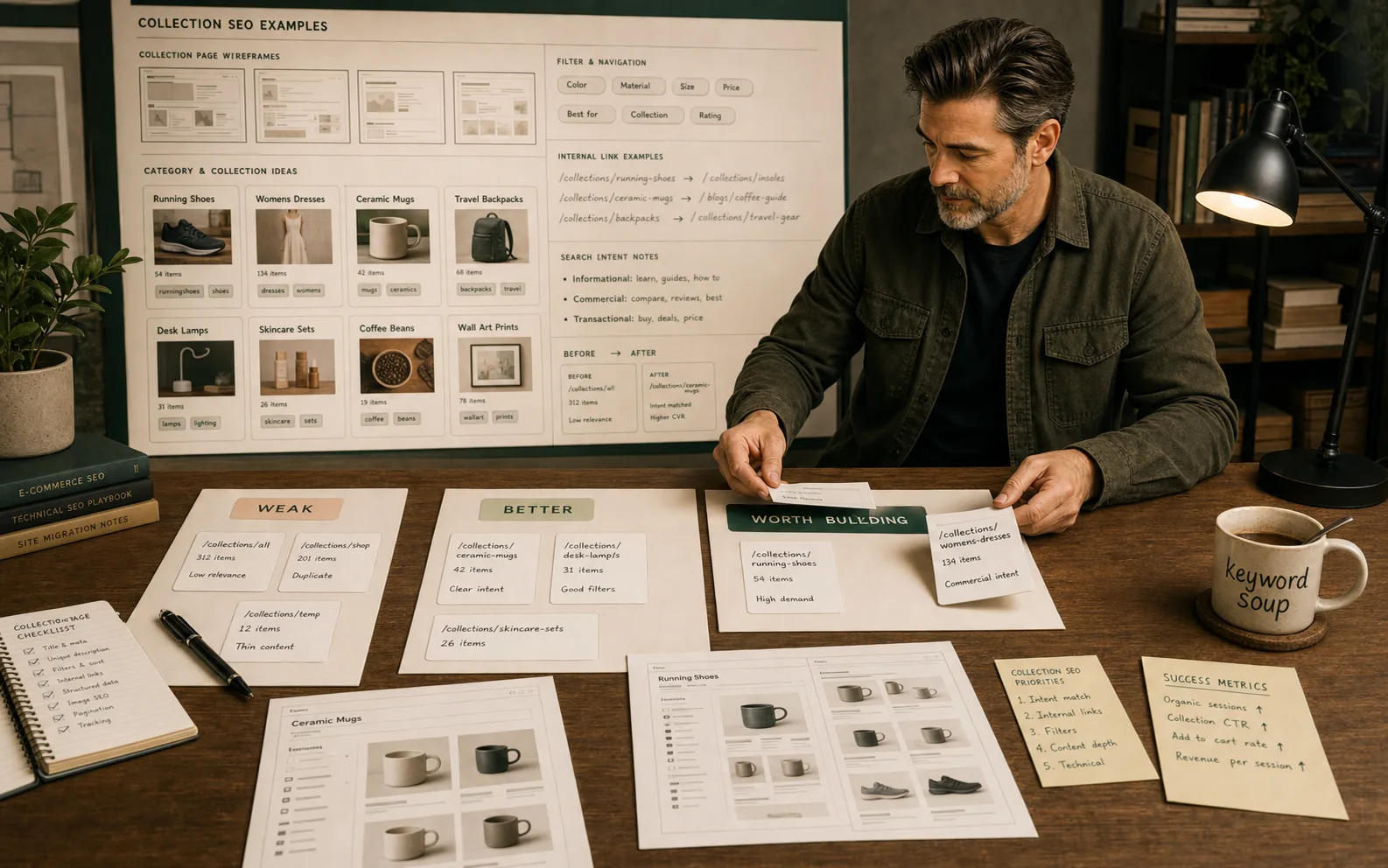
Collection SEO is easier to judge when you can see the difference between a thin product grid, a useful commercial category page and a filter combination that should not become a landing page.
The page must earn its own intent
A collection deserves SEO investment only when it has demand, product depth, a distinct decision, crawlable support and a reason to exist beyond merchandising convenience.
The fix is usually page meaning
Better collection SEO usually improves category clarity, product evidence, internal links, filters and shopper guidance before metadata polish.
Good collection SEO is easier to see than to explain
Most Shopify collection advice says the same things:
- write better collection descriptions;
- add keywords;
- optimise title tags;
- improve internal links;
- use filters carefully.
That advice is not wrong. It is just incomplete.
The harder question is: what does a better collection page actually look like?
The examples below are not client case studies or pretend before/after wins. They are practical patterns for judging real Shopify collections.
A strong collection page is not a blog post wearing a product grid as a hat. It is a commercial decision page. It helps shoppers understand a category, narrow the choice and move toward the right product.
The collection page test
Before looking at examples, use this test.
A Shopify collection deserves SEO investment when it can answer “yes” to most of these:
| Test | Good sign | Warning sign |
|---|---|---|
| Search demand | People search for the category or modifier. | The page exists only because the store can create it. |
| Product depth | The collection has enough relevant products. | The page promises more range than the grid proves. |
| Distinct intent | It solves a different shopping decision from nearby collections. | It overlaps heavily with another collection. |
| Internal support | Navigation, guides, products or sibling pages link to it. | The collection is mostly orphaned. |
| Filter logic | Filters help shoppers without creating indexation noise. | Every filter behaves like a possible SEO page. |
| Commercial value | The page can plausibly support revenue. | It attracts vague traffic with no buying path. |
If a collection fails this test, do not “SEO it harder”. Decide whether it should be merged, kept for merchandising, noindexed, improved later or rebuilt properly.
Example 1: the thin grid collection
What the page looks like
The collection is called Desk Lamps.
It has:
- a clear enough H1;
- 31 products;
- sort and filter controls;
- a title tag close to the category;
- no useful intro;
- no buying guidance;
- no sibling links;
- no links from related guides.
Why it is weak
The page technically exists, but it does not help the shopper decide.
Someone searching for desk lamps may care about:
- task lighting;
- adjustable arms;
- LED brightness;
- USB charging;
- clamp vs freestanding design;
- small desks;
- home office style;
- bulb compatibility;
- delivery and returns.
If the page only shows products, search engines and shoppers have to infer the category quality from the grid alone.
Better version
Keep the products visible early. Do not bury the grid under an essay.
Improve the page with:
- a short intro explaining the main choices;
- filters that match real shopper decisions;
- sibling links such as
LED desk lamps,small desk lamps,adjustable desk lamps; - a lower-page guide to brightness, size and placement;
- product cards with useful names and images;
- links from a home-office buying guide;
- title and meta aligned to the collection, not stuffed.
The better page does not say “desk lamps” ten more times. It proves that the page understands the shopping decision.
Example 2: the collection that is really a filter
What the page looks like
The store has a collection or tag page for:
Blue waterproof trail running shoes under £100
It contains:
- 3 products;
- unstable stock;
- very specific filter-like intent;
- no unique copy;
- no links from navigation;
- near-duplicate overlap with
Trail Running Shoes.
Why it is risky
This is probably not a collection page. It is a filtered result pretending to be a landing page.
Google’s faceted navigation guidance warns that filter and parameter combinations can create large numbers of low-value crawlable URLs when every combination is treated as a page.
That matters on Shopify because tags, filters, apps and theme logic can create URL patterns that look useful to shoppers but weak to search.
Better version
Keep the filter useful for shoppers, but do not treat it as a major SEO page unless it earns the role.
The stronger structure might be:
- indexable collection:
Trail Running Shoes; - indexable collection if justified:
Waterproof Trail Running Shoes; - filters: colour, size, price, brand;
- noindex/canonical discipline where filter pages do not deserve indexation;
- internal links only to durable collection pages.
Filters are not the problem. The problem is treating every filtered demand as if it deserves a real landing page.
Use the Shopify faceted navigation SEO guide if this is the main problem.
Example 3: the collection description that talks too much
What the page looks like
The collection has a 700-word block of text above the product grid.
It includes:
- brand story;
- generic category explanation;
- repeated keywords;
- several internal links;
- a few FAQs;
- then products.
Why it is weak
The copy may contain useful words, but the layout is working against the shopper.
Commercial collection pages should confirm intent quickly and let products appear early. If the grid is pushed too far down, the page starts to feel built for search engines rather than buyers.
Better version
Split the content by job:
- top: short category confirmation and a clear path to products;
- near grid: filters, sort, product count and subcategory links;
- lower page: buying guidance, comparisons and FAQs;
- sidebar or cards: related collections and guides.
A useful opening might be:
Choose ceramic mugs by size, handle shape, finish and dishwasher suitability. Use the filters to narrow by colour, capacity and set size, then compare individual product details before buying.
That is better than a poetic history of mugs. Mugs have had a long journey. The shopper mostly wants the right one.
Example 4: the collection with the wrong products
What the page looks like
The H1 says Women's Linen Dresses.
The grid includes:
- linen dresses;
- cotton dresses;
- polyester summer dresses;
- a few out-of-stock products;
- mixed colours and lengths;
- product names that do not mention material.
Why it is weak
The page promise and the product evidence do not match.
This matters for SEO, conversion and AI visibility. A category page cannot confidently represent an intent if the product range does not support it.
Better version
Fix the merchandising before the metadata:
- remove products that do not fit the category;
- improve product titles and attributes where material matters;
- link to nearby collections such as
Summer DressesandCotton Dresses; - add filters for size, length, colour and sleeve style;
- explain linen-specific buying considerations lower on the page;
- make sure product pages contain material evidence too.
Then review the title tag and meta description.
Do not make the metadata promise what the products cannot prove.
Example 5: the orphaned collection
What the page looks like
The collection is useful. It has demand and products.
But:
- it is not linked from the main category;
- no guide links to it;
- product pages do not link back clearly;
- it is not in navigation;
- Search Console impressions are weak.
Why it is weak
Internal links define importance and guide shoppers.
If a collection is valuable but unsupported, it may be crawled less often, receive fewer internal signals and miss users who would have chosen it.
Better version
Add internal links where they help:
- parent collection to subcollection;
- buying guide to collection;
- product pages to parent collection;
- blog content to commercial page;
- sibling collections to each other when the comparison is useful.
Use descriptive anchor text. “View all” is fine for navigation, but contextual links should explain the decision:
compare waterproof trail running shoes;shop adjustable desk lamps;choose linen dresses by length and fit.
Use the Shopify internal linking guide for the full internal-linking process.
Example 6: the collection that should be a guide
What the page looks like
The page targets a query like:
best running shoes for beginners
The store creates a collection with mixed products and a short intro.
Why it is weak
The query may be comparison-led or advice-led rather than pure category shopping.
That does not mean the collection cannot participate. It means the page type may be wrong.
Better version
Use two connected pages:
- guide:
Best Running Shoes for Beginners; - collection:
Beginner Running Shoes.
The guide explains the decision and links to the collection. The collection shows the range and helps users narrow products.
This avoids forcing one page to do two jobs badly.
Example 7: the collection worth building
What the opportunity looks like
Search Console, keyword research and store data suggest demand for:
Ceramic Coffee Mugs
The store has:
- 42 relevant products;
- stable stock;
- product attributes for material, size and dishwasher suitability;
- existing internal links from blog content;
- a parent
Mugscollection; - good commercial value.
Why it deserves a page
This is not just a filter. It is a durable category with a distinct shopping decision.
The collection can help shoppers compare:
- material;
- size;
- handle type;
- set vs single mug;
- microwave/dishwasher suitability;
- gift use;
- design style.
Better version
Build it properly:
- clear URL handle such as
/collections/ceramic-coffee-mugs; - H1 that matches the category;
- short useful intro;
- relevant product grid;
- filters by colour, capacity and set size;
- internal links from
Mugs, coffee guides and gift guides; - lower-page guidance;
- FAQs based on real shopper questions;
- product pages with material evidence.
This is the kind of collection SEO work that can compound.
What not to do
Avoid these patterns:
- creating a collection for every keyword variation;
- letting every tag behave like an SEO page;
- writing long generic text above the product grid;
- using blog posts to replace weak commercial pages;
- changing metadata before checking product relevance;
- ignoring internal links;
- letting apps generate duplicate titles, schema or filter pages without review;
- treating Search Console queries as automatic page instructions.
Search demand is an input. It is not a command.
How to choose the next collection to improve
Use this priority order:
- Collections with revenue or assisted revenue.
- Collections with impressions but weak clicks.
- Collections with backlinks or strong internal importance.
- Collections where products clearly support a stronger category.
- Collections that connect to guides, comparisons or seasonal demand.
- Thin or temporary collections only after the important pages are stable.
If a collection has no products, no demand, no stable stock and no useful internal links, it is not a priority. It may not need to exist as an indexable page.
How to measure the fix
After improving a collection, watch:
- Search Console impressions by URL;
- queries that match the intended category;
- click-through rate;
- product-grid engagement;
- add-to-cart behaviour;
- revenue or assisted revenue;
- crawl/indexation status;
- internal links into the page;
- whether filters create unwanted URL noise.
Do not judge the fix after two days. Collection pages often need time to be crawled, understood and tested by users.
Source notes
These recommendations are grounded in practical Shopify SEO review patterns and current public guidance from:
- Google ecommerce SEO documentation;
- Google product structured data documentation;
- Google faceted navigation crawling guidance;
- Shopify SEO help documentation.
The useful lesson across those sources is consistent: important ecommerce pages need clear visible content, crawlable structure, consistent product information and sensible URL handling. Collection SEO is not a paragraph-length contest.
Where to go next
If you need the full collection-page process, use Shopify collection page SEO.
If you are deciding whether a collection deserves work at all, open the Shopify SEO priority planner and classify the page type first.
If filters and tags are the problem, use Shopify faceted navigation SEO before creating more collection pages.
Quick answer
Shopify SEO becomes operational when the constraint is clear, the right page type is fixed, the output is tested and the commercial impact is reported.
What you will do
- Prioritise technical SEO work by page type and business value.
- Fix crawl, indexation, metadata, template, image and internal-link problems in the right order.
- Decide when a tool is needed and when native Shopify controls are enough.
What to check first
- Shopify admin for search listings, redirects, products, collections and theme settings.
- Google Search Console for indexing, queries and landing-page movement.
- GA4 or Shopify reports for commercial impact.
- Research tools for keyword, competitor and audit processes.
- TinyIMG where image handling is the repeated constraint.
Work through it in this order
- Choose the page type being fixed: collection, product, blog, page, filter, vendor or migration URL.
- Check crawlability, indexability, canonical, title, H1, internal links, schema and page speed.
- Compare Search Console queries with the page intent.
- Fix the template or content pattern before editing dozens of individual pages.
- Retest the page in a crawler, browser, structured data validator and Search Console where relevant.
- Record the change date, owner, expected impact and next review date.
Real-world notes
- Most Shopify SEO gains come from page architecture and template fixes, not from installing another SEO app.
- Collection pages usually carry the commercial opportunity; product pages usually supply evidence and conversion detail.
- A technical fix that is not tied to a page type and a commercial priority becomes backlog noise.
Final checks
- Page type selected.
- Primary query intent confirmed.
- Canonical and indexability checked.
- Title, H1 and meta reviewed.
- Internal links updated.
- Schema output checked.
- Image weight reviewed.
- Change logged for reporting.
Watch-outs
- Do not index every filter combination. Create clean collections for valuable facets instead.
- Do not change handles on ranking pages unless the redirect and internal-link update are ready.
- Do not trust app-generated schema until you inspect the final page output.
Use the Shopify SEO Audit Checklist, then move into the roadmap, URL structure or collection guide for the page type in front of you.
Field questions
What is a good Shopify collection SEO example?
A good example is a collection page with a clear H1, relevant products, useful buying guidance, crawlable internal links, sensible filters and metadata that matches the page intent.
What is a weak Shopify collection page?
A weak collection page is often just a product grid with a generic title, mixed products, little context, no internal links and no clear reason to rank for a specific category.
Should Shopify collection descriptions be long?
Not usually above the product grid. Use a short helpful intro near the top and put deeper buying guidance, FAQs or comparison support lower on the page where it helps shoppers.
Should every Shopify tag become a collection?
No. A tag or filter should become a collection only when it has search demand, enough products, stable stock, distinct intent and internal-link support.
Do filters help Shopify collection SEO?
Filters help shoppers narrow products, but not every filtered URL should be indexed. Filter strategy needs crawl control, canonical discipline and clear collection rules.
How do I know which collection to improve first?
Start with collections that already have impressions, revenue potential, backlinks, product depth or a clear mismatch between search demand and page quality.
Can collection pages rank without blog content?
Yes, if the collection itself satisfies the commercial intent. Blog content can support collections through internal links, but it should not replace the commercial page.
What should I measure after improving a collection?
Measure impressions, clicks, query relevance, product-grid engagement, add-to-cart behaviour, assisted revenue and whether internal links send users into the right products.